
Chapter 2 — full chapter
Chapter 2 — full chapter
2.2 3D Computational Design Tools
Computational design changes what it means to model: instead of drawing a shape, the designer defines rules, parameters, and relationships among data that generate geometry. This section introduces parametric thinking, the use of data as a design material, and the direct sustainability gains of designing systems rather than single objects.
2.2.1 Designing Systems, Not Shapes: Parametric and Computational Design
In a visual programming environment such as Grasshopper[22] (integrated with Rhinoceros) or Geometry Nodes[21] in the open-source Blender, the design is described as a network of operations whose inputs can be changed at any time, regenerating the entire model instantly. The design is no longer a single shape but a system capable of producing families of shapes. Data acts as a design material: biomechanical measurements, gait analysis, force maps, or performance targets are translated into parametric systems that modulate thickness, lattice density, curvature, or reinforcement locally across the product. Performance logic is embedded directly into geometry, instead of adding cushioning, support, or stiffness as separate components, these characteristics are expressed through continuous geometric variation, which aligns naturally with additive manufacturing, where complexity carries no cost penalty. The two main environments embody the paradigms of section 2.1: Grasshopper operates on Rhino’s exact NURBS geometry and remains the industry standard where dimensional precision is required, while Blender’s Geometry Nodes bring the same node-based procedural logic to mesh modeling in a free, open-source environment, a relevant consideration for education and small studios.
The sustainability implications are direct. Material is placed only where structurally needed, reducing mass and waste by design; one well-built parametric model replaces dozens of manually remodeled variants and adapts automatically to different sizes, materials, or production methods; and functional integration reduces material heterogeneity, which, as Chapter 6 shows, is what makes products recyclable in practice. The output is a production-ready file: export workflows (STL, STEP, IGES), mesh optimization, and wall-thickness control connect the parametric model to the manufacturing technologies of Chapter 4.
2.2.2 Case example: Nervous System, Kinematics dress
The Kinematics dress by Nervous System[2] (Jessica Rosenkrantz & Jesse Louis-Rosenberg, 2014) is the canonical demonstration of computational design applied to garments. The dress is generated as a tessellation of thousands of unique, interlocking rigid modules laid over a 3D scan of the wearer’s body: through the Kinematics Cloth app, the customer adjusts fit, module density, and pattern, and the algorithm produces a garment that drapes and moves like fabric, although every element is rigid polyamide. Before production, the digital garment is computationally folded, compressed by simulation, so that it fits the build volume of an SLS printer and emerges printed in one piece, fully assembled, with no sewing. The first dress entered the Museum of Modern Art's collection in New York.
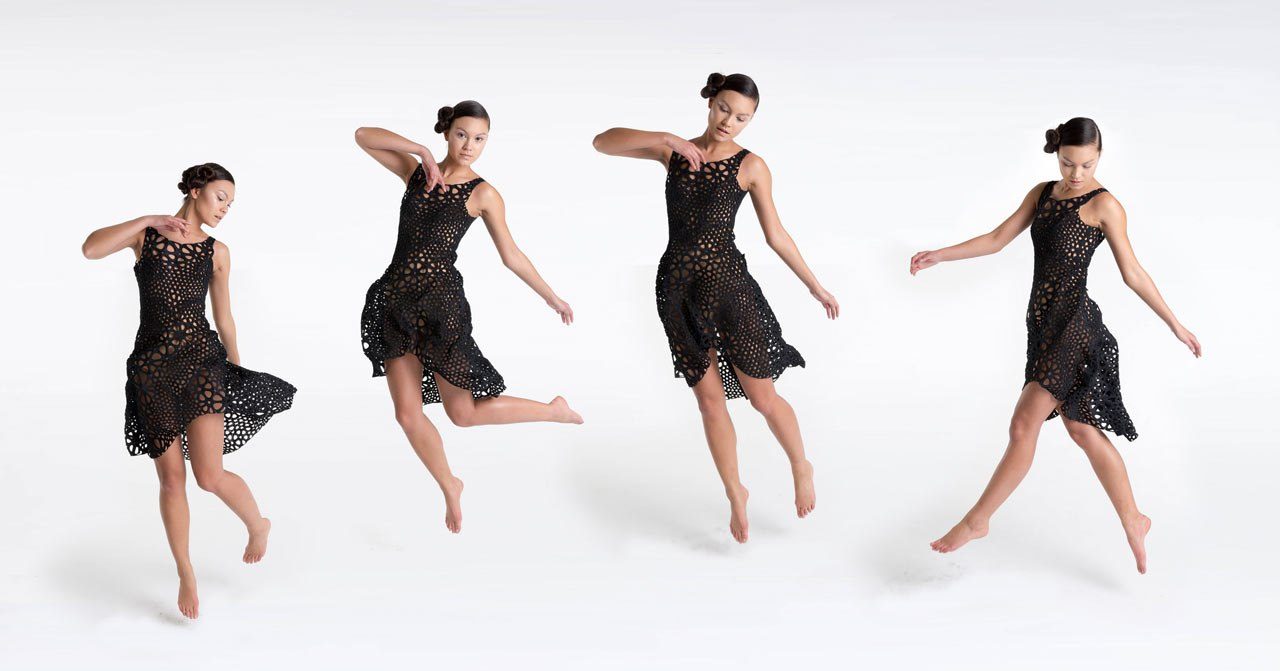
Figure 2.4, Nervous System, Kinematics dress, thousands of interlocking 3D-printed modules, printed fully assembled via SLS (press images: n-e-r-v-o-u-s.com/press). © Nervous System
A complementary reference practice is the work of Julia Koerner[27] (JK Design / JK3D), an architect and UCLA faculty member, whose fashion output is generated almost entirely through parametric workflows and produced additively. Her Setae Jacket (Chro-Morpho collection, with Stratasys) translates the micro-structure of butterfly setae into thousands of colour-graded lamellae printed directly onto textile; the ARID collection (Re-FREAM / ‘Digital Vogue’, co-funded by the EU Horizon 2020 programme) is a fully 3D-printed garment system designed remotely between Vienna and Los Angeles, assembled without sewing and sized digitally to the wearer; and her collaborations range from Iris van Herpen’s Voltage and Hybrid Holism couture (with Materialise) to the 3D-printed crown and mantle for Ruth E. Carter’s Academy-Award-winning Black Panther costumes. Koerner’s practice condenses the argument of this section: geometry generated from rules and data, material placed only where needed, and digital fit replacing physical sampling. Comparable computational-couture references, Iris van Herpen, Nervous System’s Kinematics dress, Danit Peleg’s home-printed collection, Ganit Goldstein’s direct-to-textile work, are documented in the Fabricademy[17] ‘Computational Couture’ open curriculum, which also proposes a useful taxonomy of 3D printing of, on, and for textiles.
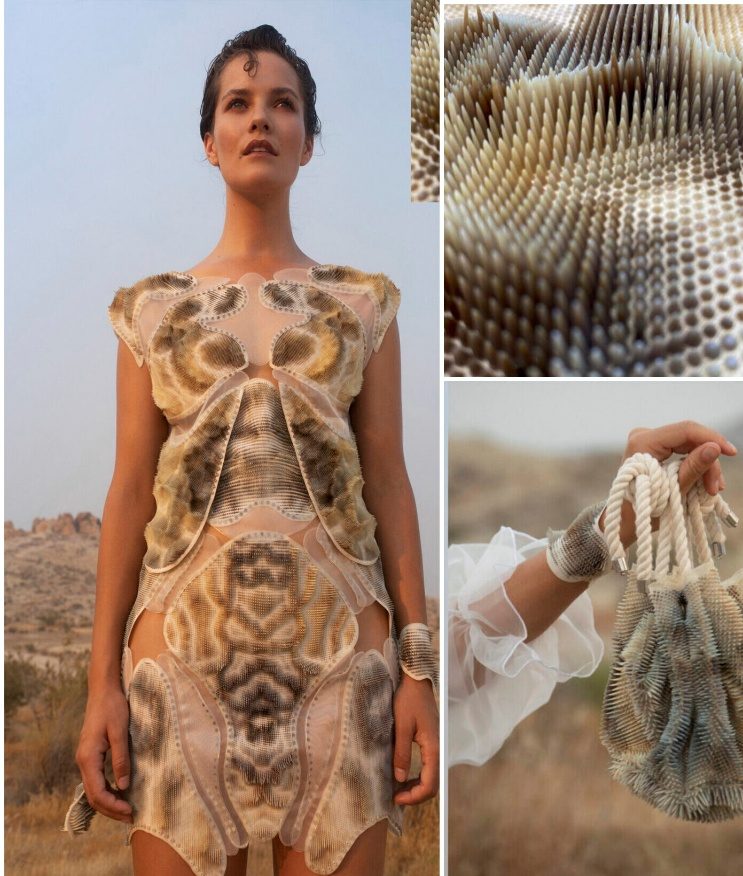
Figure 2.5, (left) Julia Koerner, ARID collection (right) Julia Koerner, Setae Jacket – Source: Julia Koerner
2.2.3 From AI Image to 3D
The fastest route from an AI concept image to a working 3D prototype has three steps. First, image-to-3D: tools such as Tripo, Meshy or Luma Genie turn a prompt or image into a rough mesh in seconds, useful for accessories, footwear and hardware, while soft garments are better rebuilt directly in garment software. Second, sketch-to-import: CLO, Browzwear and Style3D accept a flat sketch or an AI-generated technical flat as a template, so the designer traces the silhouette and builds the pattern on top, the AI image becomes the blueprint, not the product. Third, assets: AI generators produce repeatable prints and surface textures that can be used directly as materials, and AI pattern fills can be turned into real print files. Digital fabric libraries complete the pipeline: a physical scan (e.g., Vizoo xTex) is the most accurate; a good photo works for flat colors and simple textures; and an AI-generated texture is fine for early concept reviews, choose the fidelity the decision requires.
|
Tool type |
What it outputs |
Free / paid |
Learning curve |
|
Image-to-3D (Tripo, Meshy, Luma Genie) |
Rough 3D mesh from a prompt or image |
Freemium |
Low |
|
Garment 3D (CLO, Browzwear, Style3D) |
Pattern and simulated garment from a sketch import |
Paid licence |
Medium–high |
|
AI asset generators (Recraft, Adobe Firefly) |
Prints, surface textures, pattern fills |
Freemium |
Low |
|
Fabric digitisation (Vizoo scan / photo / AI texture) |
PBR digital fabric for simulation |
Scan paid; photo and AI low-cost |
Low–medium |
Try it now
Take one AI image of a garment and bring it into 3D: generate a mesh with a free image-to-3D tool, or import the image into CLO / Browzwear (or a free trial) as a sketch template and build a simplified prototype, a simple top or an accessory is enough. Deliverable: one 3D file plus a short note on where the AI image misled you (proportions, construction, material behavior).