Chapter 2 — full chapter
| Site: | FashionKIC Learning Platform |
| Course: | Digital Tools and AI for Sustainable Fashion |
| Book: | Chapter 2 — full chapter |
| Printed by: | Guest user |
| Date: | Sunday, 1 November 2026, 3:19 AM |
2.1 2D Digital Drawing and 3D Design
This section follows the designer's toolchain from the first digital sketch to the first 3D model: vector drawings for concepts, technical drawings, and tech packs, and the transition to 3D modeling, where products become precise, testable geometry. Together, they form the foundation on which the computational, AI-based, and zero-waste methods of the following sections are built.
2.1.1 From Pencil to Vector: The Digital Design Toolkit
The work of a fashion designer today combines creative expression with technological competence. Instead of paper and pencil alone, designers use vector-based software such as Adobe Illustrator[8] or the open-source Inkscape[26], as well as professional alternatives such as Affinity Designer[9] and CorelDRAW[14]. Unlike raster graphics, which are made of pixels, vector graphics are based on mathematically defined lines and shapes: a vector drawing can be scaled infinitely without loss of quality, and individual elements can be modified quickly, proportions, colors, materials, details, without redrawing from scratch. In the professional industry, vector graphics serve conceptual sketches, technical drawings and tech packs, print and branding graphics, and presentation materials. A technical drawing shows the product without the human figure but with accurate proportions, front and back views, profile views for complex products, construction notes, and detail 'microviews', and this precision is a sustainability tool: standardized digital communication between designer, construction team, and production reduces errors, misinterpretation, and unnecessary physical prototypes.
Digital drawing also clarifies a distinction every designer must master: the different types of sketches and what each is for. The fashion illustration (figurino) presents the garment on a stylized figure, typically a front three-quarter view, often elongated to nine or ten head heights, and communicates attitude, proportion, color, and fabric behavior; it is evocative by design and metrically unreliable by intention. Study drawings and technical flats do the opposite: the product is drawn without the figure, in absolute orthographic views, front, back, side, and, where necessary, top and bottom, at a consistent scale, so that every view describes the same object unambiguously. Between the two sit exploratory study sketches: quick multi-view drawings used to reason volume, construction, and detail before committing to geometry. In a digital workflow, the three types form a chain, the figurino sets the design intent, multi-view study drawings resolve the form, and the technical flat locks it into the tech pack that production will quote against.
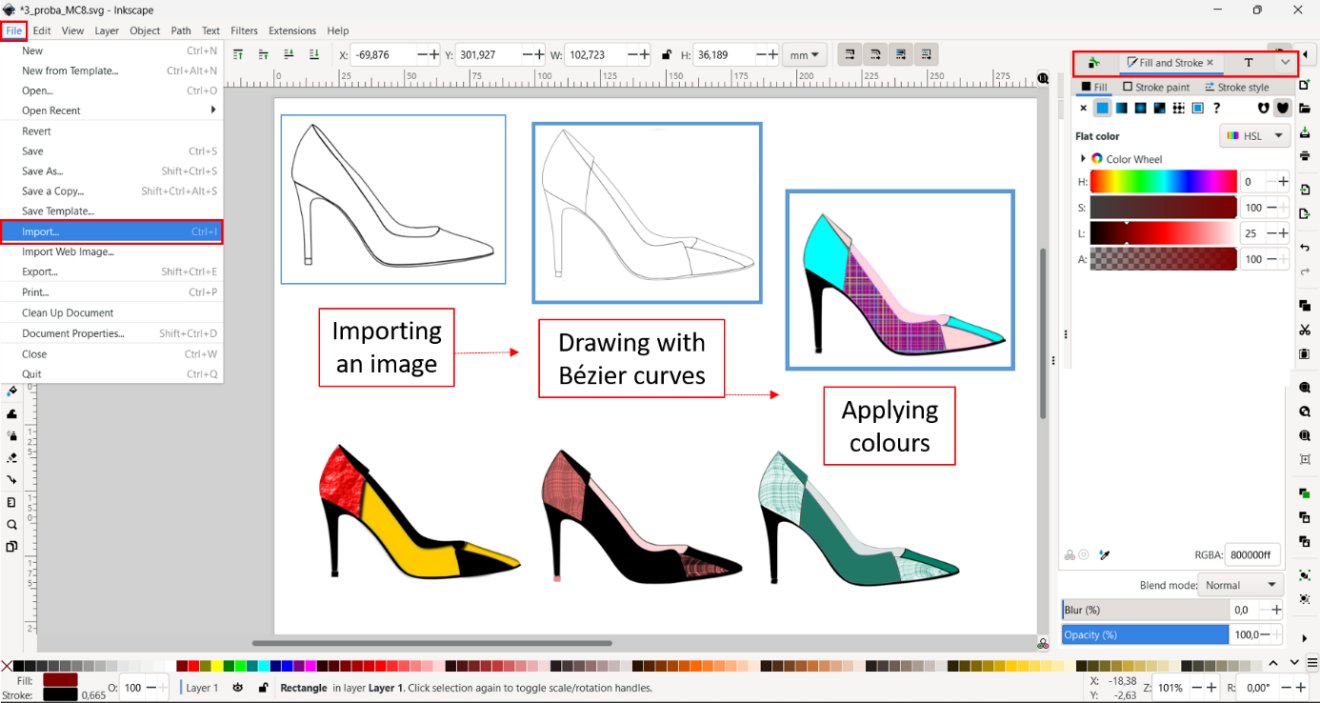
Figure 2.1, Vector workflow in Inkscape: importing a sketch, drawing with Bézier curves, applying colors.
The natural next step is the third dimension. Sketches are digitized, vectorized, and translated into 3D environments, where products are modeled from curves, surfaces, and solids in software such as Rhinoceros [36], using precise units, layers, and reference geometry. In footwear, for example, a sole is modeled against the last, building 2D and 3D curves as guides, generating surfaces through sweep, loft, and patch operations, and refining solids with Boolean and Sub-D techniques. The key insight of 3D design is that geometry encodes function: decisions about thickness, curvature, and transitions determine how forces are distributed, how the product wears over time, and whether it can be manufactured at all, and modeling digitally means anticipating these relationships early, when changing them costs nothing but a file revision.
The 3D landscape itself is not monolithic: modelers differ in how they describe geometry, and the choice has direct consequences for precision, editability, and manufacturability. Surface modelers such as Rhinoceros work with NURBS, mathematically exact curves and surfaces, and excel at the controlled free-form skins of footwear, eyewear, and accessories, where curvature continuity matters. Solid modelers such as Autodesk Fusion[10] or SolidWorks[38] describe products as closed, watertight volumes with a parametric feature history, making them the natural choice for hardware, buckles, heels, molds, and any component that must carry dimensions and tolerances into production. Mesh-based tools such as Blender[11] (or ZBrush[48] for digital sculpting) approximate form with polygon meshes extremely fast for organic exploration, visualization, and animation, but without exact dimensional control, meshes are the language of rendering and 3D printing rather than of engineering. Garment-specific software such as CLO3D[13], Browzwear[12], or Style3D[41] takes a fourth route: the garment is constructed as 2D patterns stitched together and draped on an avatar through physics simulation of the fabric’s mechanical properties, the digital equivalent of the atelier, and the foundation of the virtual prototyping covered in Chapter 3. In practice, these paradigms are combined, and translation between them (e.g. NURBS to mesh for printing) is a one-way, lossy step the designer must plan for.
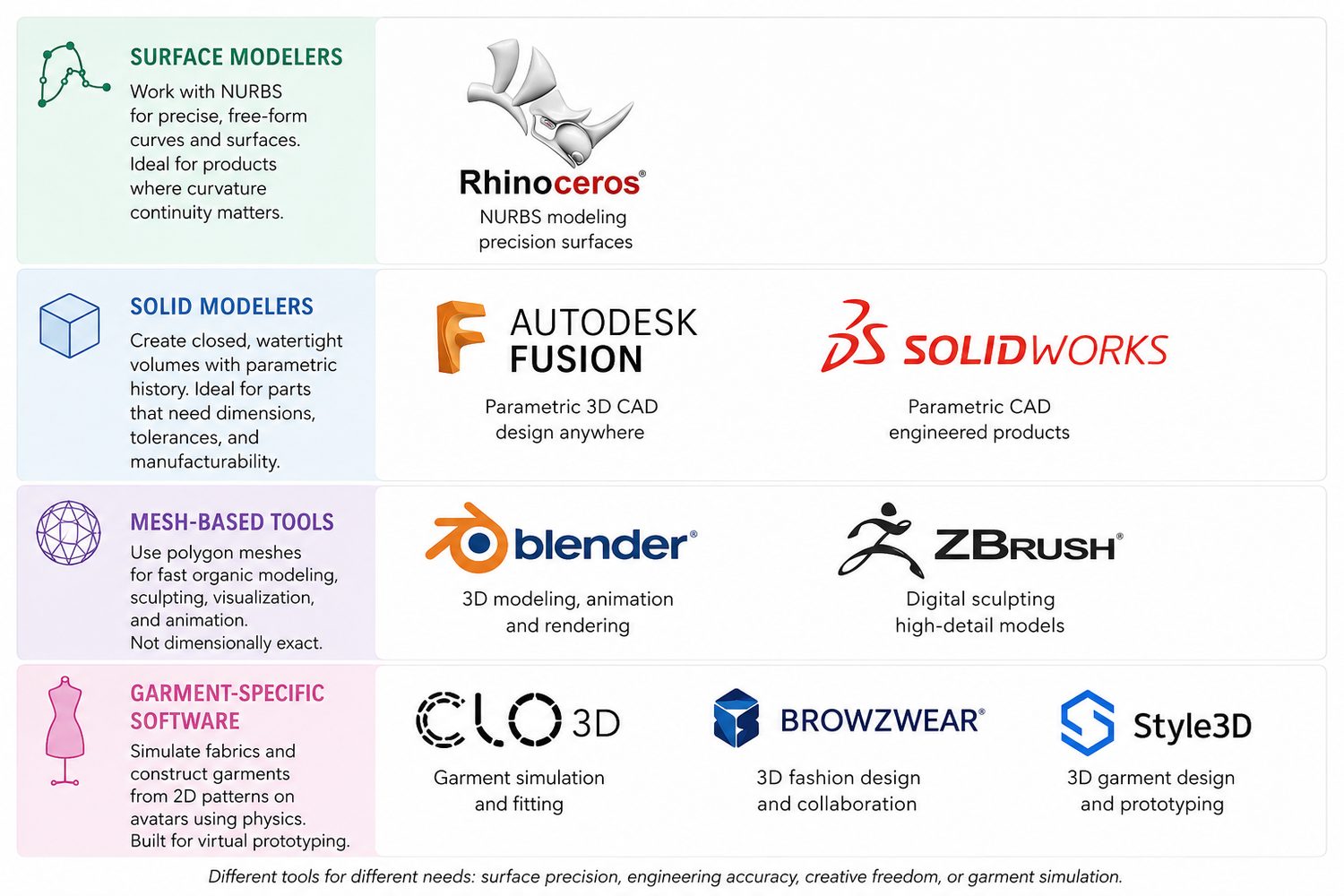
Figure 2.2, Four families of 3D modeling software: surface modelers (NURBS), solid modelers (parametric), mesh-based tools, and garment-specific simulation.
2.1.2 Case example: Tommy Hilfiger / PVH, designing at 100% digital
In 2017, Tommy Hilfiger (PVH Europe) founded the in-house tech incubator STITCH[40] with a declared goal: moving all global design teams at the Amsterdam headquarters to fully digital product creation, reaching 100% 3D apparel design by the Spring 2022 collections. The garment-making design workflow was rethought end-to-end: Digital libraries of fabrics, colors, and patterns replace physical swatches; garments are designed and reviewed as 3D models; and the tech pack, the technical drawing set with construction notes, is generated from the same digital assets, keeping designer, construction team, and suppliers on a single unambiguous reference.
The sustainability results are measurable. For the Fall 2020 season, the men’s dress-shirt category was designed entirely in 3D and required no physical sample production; digital showrooms allowed the company to re-sequence its go-to-market process from sample-led to brand-led selling, cutting sample volumes, courier shipments, and time-to-market. By 2019, associates in more than half of the apparel divisions at headquarters had been trained through the STITCH Academy, with the technology active across more than 20 product groups. The case demonstrates the central claim of this section: a standardized digital drawing-and-modeling chain is not only a creative tool but an infrastructure that removes errors, samples, and waste before anything is produced. (The STITCH incubator has since been discontinued as a separate entity.) (Sources: PVH / Tommy Hilfiger press release, November 2019; Textile World[42]; STITCH case documentation.)
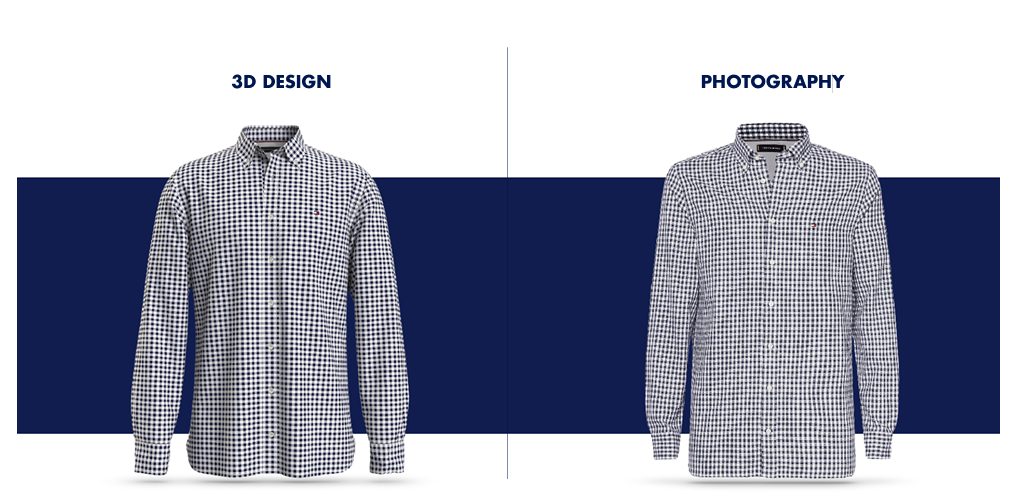
Figure 2.3, Digital twin of a men’s shirt developed within Tommy Hilfiger’s STITCH program: 3D design (left) vs photograph (right). (Source: PVH / STITCH)
2.2 3D Computational Design Tools
Computational design changes what it means to model: instead of drawing a shape, the designer defines rules, parameters, and relationships among data that generate geometry. This section introduces parametric thinking, the use of data as a design material, and the direct sustainability gains of designing systems rather than single objects.
2.2.1 Designing Systems, Not Shapes: Parametric and Computational Design
In a visual programming environment such as Grasshopper[22] (integrated with Rhinoceros) or Geometry Nodes[21] in the open-source Blender, the design is described as a network of operations whose inputs can be changed at any time, regenerating the entire model instantly. The design is no longer a single shape but a system capable of producing families of shapes. Data acts as a design material: biomechanical measurements, gait analysis, force maps, or performance targets are translated into parametric systems that modulate thickness, lattice density, curvature, or reinforcement locally across the product. Performance logic is embedded directly into geometry, instead of adding cushioning, support, or stiffness as separate components, these characteristics are expressed through continuous geometric variation, which aligns naturally with additive manufacturing, where complexity carries no cost penalty. The two main environments embody the paradigms of section 2.1: Grasshopper operates on Rhino’s exact NURBS geometry and remains the industry standard where dimensional precision is required, while Blender’s Geometry Nodes bring the same node-based procedural logic to mesh modeling in a free, open-source environment, a relevant consideration for education and small studios.
The sustainability implications are direct. Material is placed only where structurally needed, reducing mass and waste by design; one well-built parametric model replaces dozens of manually remodeled variants and adapts automatically to different sizes, materials, or production methods; and functional integration reduces material heterogeneity, which, as Chapter 6 shows, is what makes products recyclable in practice. The output is a production-ready file: export workflows (STL, STEP, IGES), mesh optimization, and wall-thickness control connect the parametric model to the manufacturing technologies of Chapter 4.
2.2.2 Case example: Nervous System, Kinematics dress
The Kinematics dress by Nervous System[2] (Jessica Rosenkrantz & Jesse Louis-Rosenberg, 2014) is the canonical demonstration of computational design applied to garments. The dress is generated as a tessellation of thousands of unique, interlocking rigid modules laid over a 3D scan of the wearer’s body: through the Kinematics Cloth app, the customer adjusts fit, module density, and pattern, and the algorithm produces a garment that drapes and moves like fabric, although every element is rigid polyamide. Before production, the digital garment is computationally folded, compressed by simulation, so that it fits the build volume of an SLS printer and emerges printed in one piece, fully assembled, with no sewing. The first dress entered the Museum of Modern Art's collection in New York.
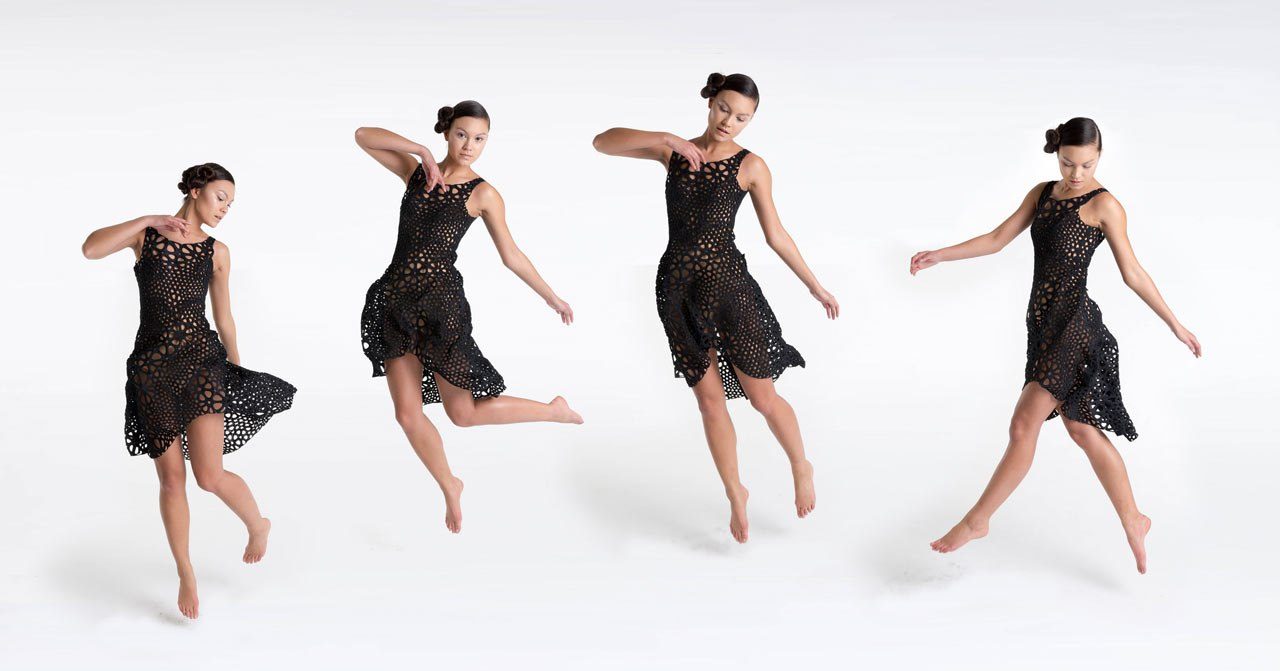
Figure 2.4, Nervous System, Kinematics dress, thousands of interlocking 3D-printed modules, printed fully assembled via SLS (press images: n-e-r-v-o-u-s.com/press). © Nervous System
A complementary reference practice is the work of Julia Koerner[27] (JK Design / JK3D), an architect and UCLA faculty member, whose fashion output is generated almost entirely through parametric workflows and produced additively. Her Setae Jacket (Chro-Morpho collection, with Stratasys) translates the micro-structure of butterfly setae into thousands of colour-graded lamellae printed directly onto textile; the ARID collection (Re-FREAM / ‘Digital Vogue’, co-funded by the EU Horizon 2020 programme) is a fully 3D-printed garment system designed remotely between Vienna and Los Angeles, assembled without sewing and sized digitally to the wearer; and her collaborations range from Iris van Herpen’s Voltage and Hybrid Holism couture (with Materialise) to the 3D-printed crown and mantle for Ruth E. Carter’s Academy-Award-winning Black Panther costumes. Koerner’s practice condenses the argument of this section: geometry generated from rules and data, material placed only where needed, and digital fit replacing physical sampling. Comparable computational-couture references, Iris van Herpen, Nervous System’s Kinematics dress, Danit Peleg’s home-printed collection, Ganit Goldstein’s direct-to-textile work, are documented in the Fabricademy[17] ‘Computational Couture’ open curriculum, which also proposes a useful taxonomy of 3D printing of, on, and for textiles.
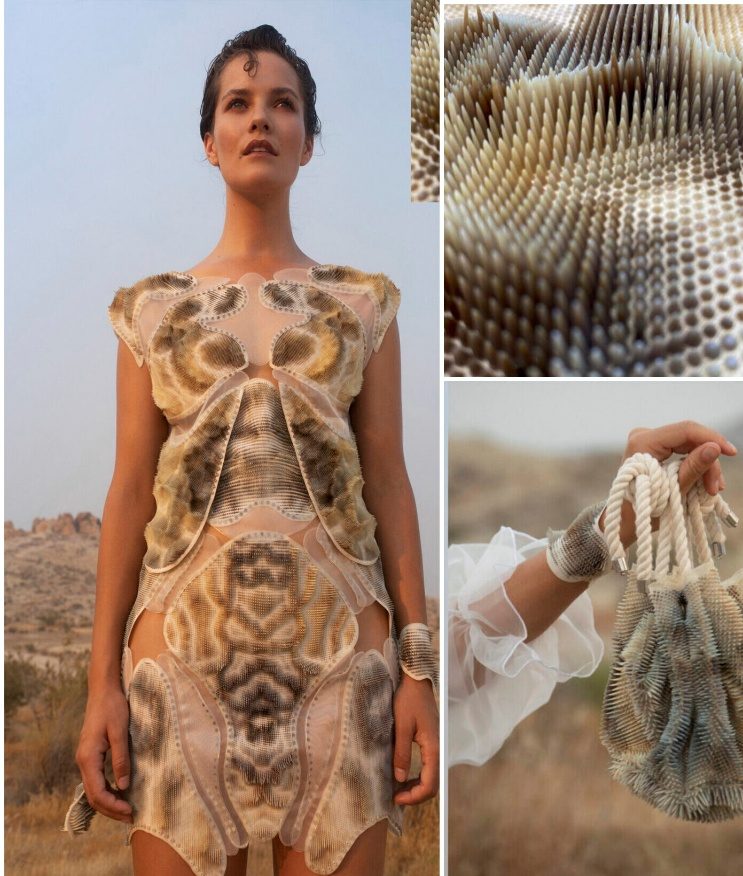
Figure 2.5, (left) Julia Koerner, ARID collection (right) Julia Koerner, Setae Jacket – Source: Julia Koerner
2.2.3 From AI Image to 3D
The fastest route from an AI concept image to a working 3D prototype has three steps. First, image-to-3D: tools such as Tripo, Meshy or Luma Genie turn a prompt or image into a rough mesh in seconds, useful for accessories, footwear and hardware, while soft garments are better rebuilt directly in garment software. Second, sketch-to-import: CLO, Browzwear and Style3D accept a flat sketch or an AI-generated technical flat as a template, so the designer traces the silhouette and builds the pattern on top, the AI image becomes the blueprint, not the product. Third, assets: AI generators produce repeatable prints and surface textures that can be used directly as materials, and AI pattern fills can be turned into real print files. Digital fabric libraries complete the pipeline: a physical scan (e.g., Vizoo xTex) is the most accurate; a good photo works for flat colors and simple textures; and an AI-generated texture is fine for early concept reviews, choose the fidelity the decision requires.
|
Tool type |
What it outputs |
Free / paid |
Learning curve |
|
Image-to-3D (Tripo, Meshy, Luma Genie) |
Rough 3D mesh from a prompt or image |
Freemium |
Low |
|
Garment 3D (CLO, Browzwear, Style3D) |
Pattern and simulated garment from a sketch import |
Paid licence |
Medium–high |
|
AI asset generators (Recraft, Adobe Firefly) |
Prints, surface textures, pattern fills |
Freemium |
Low |
|
Fabric digitisation (Vizoo scan / photo / AI texture) |
PBR digital fabric for simulation |
Scan paid; photo and AI low-cost |
Low–medium |
Try it now
Take one AI image of a garment and bring it into 3D: generate a mesh with a free image-to-3D tool, or import the image into CLO / Browzwear (or a free trial) as a sketch template and build a simplified prototype, a simple top or an accessory is enough. Deliverable: one 3D file plus a short note on where the AI image misled you (proportions, construction, material behavior).
2.3 Generative AI for Design: Prompt Engineering and AI-to-3D
Generative models change the economics of the front end of design. A concept that once cost hours of drawing or modeling now costs a sentence, and the binding constraint shifts from producing options to evaluating them. This section covers both halves of that shift: prompting, where written intent becomes a visual proposal, and AI-to-3D, where an image becomes geometry that can be measured and, in some product categories, manufactured. The critical question throughout is not whether the output looks convincing but whether it holds up as a product proposal. Visual plausibility is cheap in these systems; verification is not.
2.3.1 Prompting as a Design Skill: Generative AI
Generative AI has become part of early-stage design practice: it accelerates ideation, expands the visual search space, and makes trade-offs visible at the concept stage. This section covers how the tools work, how prompt engineering functions as a design skill, and how to evaluate AI output critically against material feasibility and circular design principles.
Most contemporary tools rely on diffusion-based image generation models trained on large datasets of images and text. Designers interact with them through prompts that describe form, materials, proportions, use context, and stylistic references, prompts are not neutral descriptions but structured expressions of intent, and prompt engineering is therefore a design skill in itself, shaping how abstract intentions are translated into visual proposals.
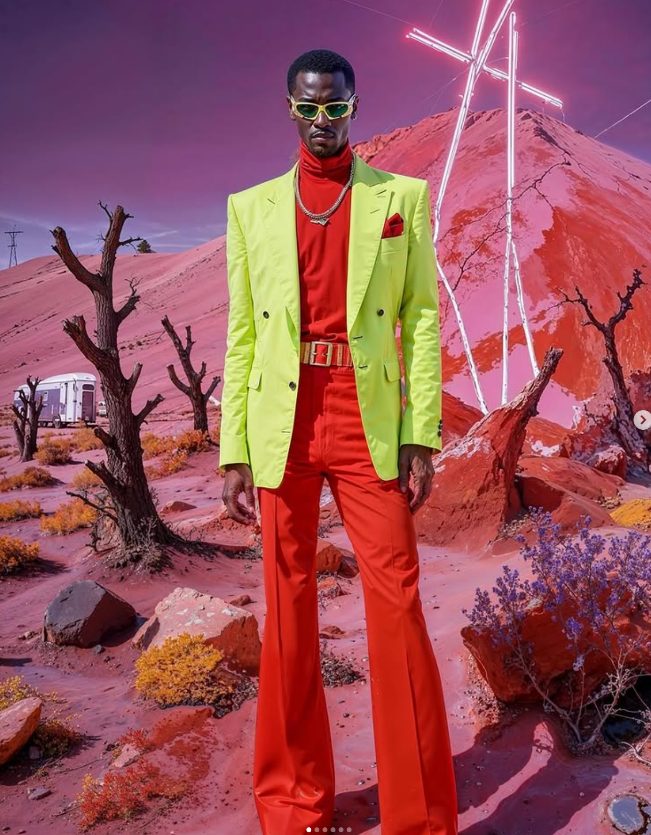
Figure 2.6, Example of AI-generated figurines (https://www.instagram.com/neural.waves/)
Because the generative-AI landscape changes so quickly, any list of tools is necessarily non-exhaustive and dates fast: the systems below are a representative snapshot, meant to show the range of approaches rather than to rank products or capture every option.
Stable Diffusion [49] _ https://stability.ai/
Stable Diffusion is an open-source image generation model widely used in creative, academic, and experimental contexts. Unlike closed commercial platforms, it can be accessed for free through community-driven web interfaces such as Hugging Face Spaces or installed and run locally on a personal computer. This openness allows users to control datasets, parameters, and workflows, making Stable Diffusion particularly relevant for research, education, and domain-specific experimentation that requires transparency and adaptability.
Midjourney [32] _ https://www.midjourney.com/
Midjourney is a diffusion-based image generation platform known for its strong visual coherence and high aesthetic quality. It prioritizes expressive imagery, stylistic exploration, and atmospheric depth, often producing results that function more as visual statements than literal representations. This makes it especially effective for exploring visual languages, moods, and speculative directions during early concept development.
OpenAI GPT Image [50] _ https://openai.com/index/introducing-4o-image-generation/
OpenAI's image generation, now delivered natively through GPT-4o and the GPT Image models rather than the standalone DALL·E app, emphasises semantic alignment between prompt and output, producing clearly defined objects and readable compositions with strong fidelity to the written description. This makes it well suited to communicating a specific, literal concept, and it integrates directly into ChatGPT's conversational workflow.
Ideogram [25] _ https://ideogram.ai/
Ideogram is a generative AI platform distinguished by its ability to accurately render text, typography, and graphic layout within images. Unlike most image generation models, which struggle with textual elements, Ideogram supports compositions that integrate words, symbols, and visual structure. This positions it as a useful tool for concept development involving branding, graphic systems, or visual communication, alongside imagery.
Adobe Firefly [18] _ https://www.adobe.com/sensei/generative-ai/firefly.html
Adobe Firefly is Adobe’s generative AI platform, developed to integrate seamlessly into professional creative workflows. Rather than focusing on radical or speculative generation, Firefly supports refinement, consistency, and controlled variation within established design environments. Its positioning emphasizes production-ready visuals and compatibility with existing creative tools.
Krea [30] _ https://www.krea.ai/
Krea is a generative AI platform characterized by real-time interaction and continuous visual feedback. Instead of producing images in discrete steps, it allows users to steer and adjust outputs dynamically during generation. This real-time quality makes Krea particularly suited to rapid ideation sessions where exploration and iteration happen fluidly rather than sequentially.
FloraFauna [19] _ https://app.florafauna.ai/
FloraFauna operates as an intelligent creative canvas that combines generative AI with compositional and organizational tools. Instead of functioning as a single-output generator, it supports the assembly, recombination, and evolution of visual ideas within a shared workspace. This approach encourages iterative concept building and visual reasoning across multiple stages of development.
FLUX.2 (Black Forest Labs) [55] _ https://blackforestlabs.ai
FLUX, developed by Black Forest Labs, the team behind the original Stable Diffusion, is a family of open and commercial models that by 2026 set the benchmark for photorealistic generation and precise prompt adherence. Available both as downloadable open weights and as a hosted API, it has become the default high-quality open alternative to closed platforms, favoured where realistic materials, lighting and product-like renders matter.
Recraft [52] _ https://www.recraft.ai
Recraft is a generative platform built for design deliverables rather than one-off images: it produces vector art, icons, mockups and packaging concepts, holds a consistent brand style across a set, and exports assets that scale to print and digital without rework, well suited to the graphic and product-communication side of a fashion collection.
Vizcom [53] _ https://www.vizcom.com
Vizcom is a design-focused tool aimed at product, footwear and apparel designers rather than at open-ended image generation. It turns a hand-drawn sketch into a full-fidelity render in seconds, keeps brand-accurate colors and materials from sketch to output, and lets designers explore form and material variations by prompt, recently extending from 2D rendering into sketch-to-3D. Its value in a sustainable-design workflow lies in control: it augments the designer's own drawing rather than replacing it, keeping human intent and manufacturability central.
Try it now
Use any of the tools mentioned above to generate three concept images of one garment with a structured prompt (form + material + context + style). Write down one thing the tool got wrong about construction, that observation is the “reading between the pixels” skill this section teaches.
- TIP: A designer with prompting skills produces usable concepts in hours instead of weeks of sketching; the IP position of AI outputs is still evolving, document your prompt workflow now
2.3.2 From Prompt to Prototype: AI-to-3D Generation
The frontier of this landscape is AI-to-3D: turning a text prompt or a generated image directly into a three-dimensional model. Two families of methods dominate. Multi-view reconstruction generates several consistent views of an object and fuses them into geometry, while native 3D-diffusion models synthesize shape directly; both then output either a polygon mesh or a Gaussian-splatting representation that is converted to a mesh, textured with physically based (PBR) maps and, in the better tools, automatically retopologised into clean quad geometry. What used to take hours of manual modelling now takes seconds to minutes.
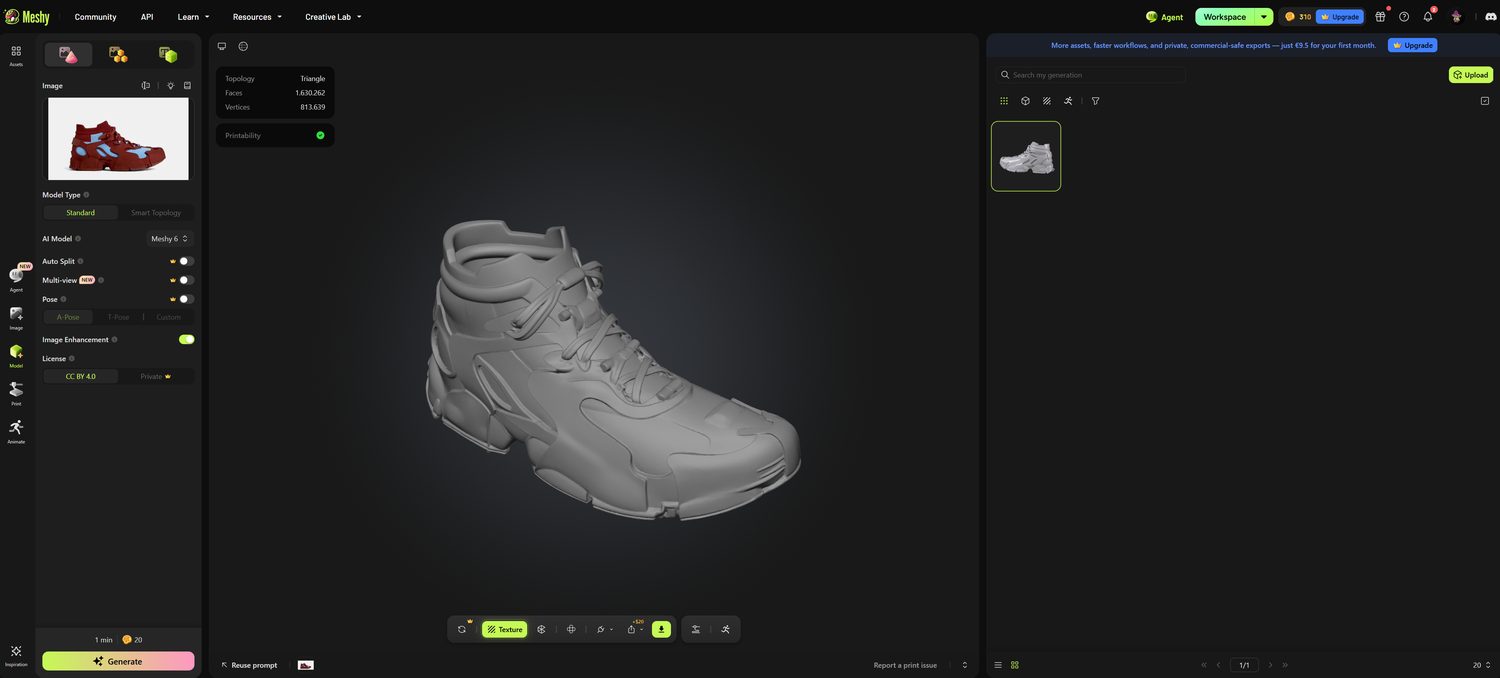
Figure 2.7, Meshy interface
The 2025–2026 tool landscape is moving fast. Commercial platforms such as Meshy, Tripo, and Hyper3D's Rodin lead on usability: Meshy emphasizes watertight, print-ready meshes with direct STL export and PBR texturing; Tripo adds near-instant quad retopology; Rodin targets highly realistic assets. Open-source models, Microsoft's TRELLIS and Tencent's Hunyuan3D, now rival them on visual quality but demand substantial GPU hardware, while earlier services such as Kaedim and Luma AI's Genie pioneered image-to-3D for game and product studios. For a design engineer, what matters is less the brand than the output class: a fast volumetric draft, not production geometry.
For fashion, the technology is unevenly useful. It performs best on hard, structured goods, footwear, eyewear, jewelry, hardware, accessories, where a solid mesh can be cleaned up, scaled and sent to additive manufacturing (Chapter 4); it is far weaker on soft, draping garments, whose behavior still belongs to the physics-based simulation of digital fabrics (Chapter 3) rather than to a static generated mesh. The pipeline emerging in footwear and accessory studios is therefore hybrid: AI image generation to explore the concept space, AI-to-3D for a fast volumetric draft, and parametric remodeling for the version that will actually be manufactured, because dimensions, wall thicknesses, and construction logic must still be rebuilt deliberately.
In a sustainable design workflow, an AI-generated concept should be read as a hypothesis about a product system: Is the object monomaterial or multi-material? Are components replaceable? Is the structure integrated or layered? Visual plausibility often masks technical, material, or sustainability inconsistencies, so outputs must be evaluated against material feasibility, construction logic, and circular design principles. Prompts can explicitly explore modularity, visible mechanical joints, disassembly, repair scenarios, and material narratives based on bio-based or recycled inputs; the designer's task is to negotiate trade-offs and articulate a defensible design position. Design judgment, not automation, remains central, and the emerging AI-to-3D pipeline, in which generated concepts inform parametric models and printable geometry, closes the loop in section 2.2.
2.3.3 Case example: G-Star RAW, the AI Denim Cape
In March 2023 the Dutch denim brand G-Star RAW[20] presented its first AI-designed denim collection: twelve concept pieces generated with Midjourney, of which one, a couture denim cape, was selected and physically produced by the brand's Amsterdam atelier. The design team worked from a documented prompt[43] (“denim cape morphic, model is wearing, organic shapes, minimal, futuristic hardware, techwear fashion”), iterated the generations, and then confronted the hard part: translating a photorealistic but structurally illogical image into a wearable garment. Deconstructing how the AI-imagined layers connected, where seams began and ended, took the atelier longer than the generation itself, and yielded construction solutions the team described as something “you would never design as a human”.
The case demonstrates how Generative AI expands the concept space upstream; the prompt itself is a design act; and human judgment, pattern-making knowledge, material understanding, manufacturability, remains the bridge from generated image to physical product, the same ‘reading between the pixels’ discipline developed in the didactic case above. Its limits are equally instructive: the cape is a single hand-made display piece, upstream of any sustainability claim, AI exploration can reduce material experimentation, but only production discipline turns concepts into responsible products. (G-Star RAW, 2023; Sourcing Journal, 2023; WWD, 2023.)
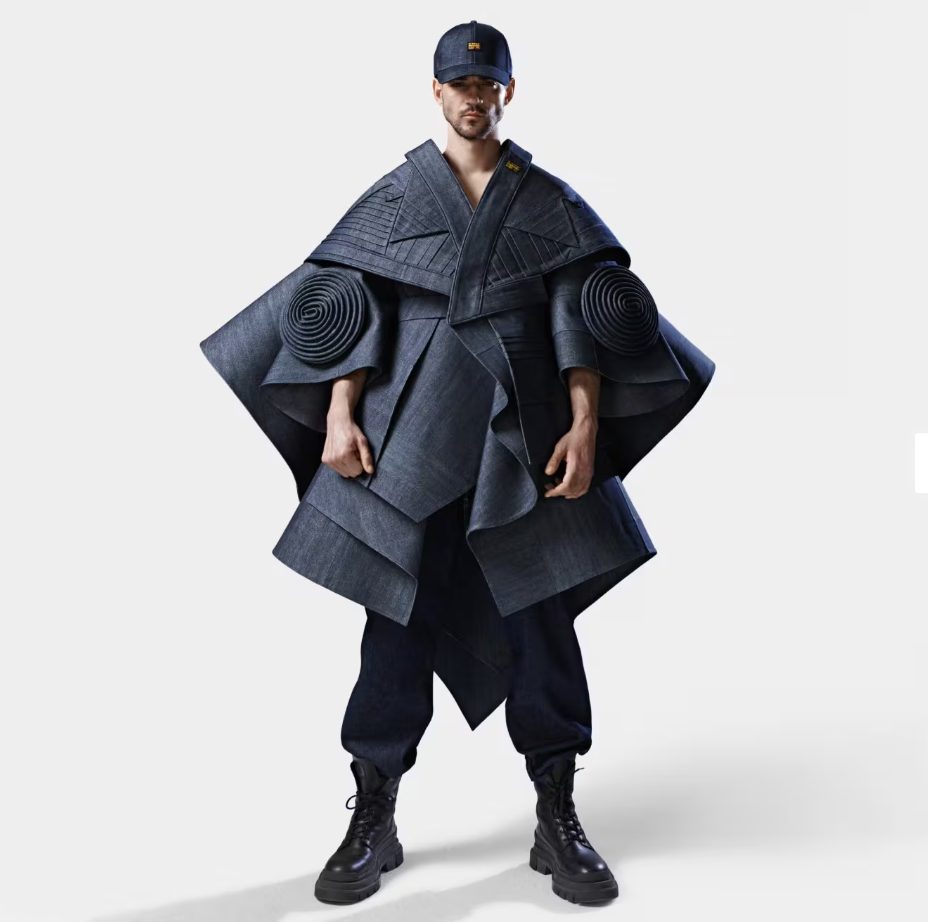
Figure 2.8, G-Star RAW's AI Denim Cape: a couture denim piece designed with Midjourney and produced in G-Star's Amsterdam atelier (2023). (Source: g-star.com)
2.3.4 Case example: Nike A.I.R. (Athlete Imagined Revolution)
Unveiled at the Palais Brongniart in Paris in April 2024, ahead of the Olympic Games, Nike’s A.I.R. project is currently the most complete industrial demonstration of the AI-to-3D pipeline described in this section. Working with 13 elite athletes across track, football, basketball, and tennis, from Eliud Kipchoge and Faith Kipyegon to Kylian Mbappé and Victor Wembanyama, Nike’s innovation team used large-language-model prompts and generative image models to translate structured athlete interviews (inspirations, aesthetics, performance needs) into hundreds of concept visuals per athlete. Critically, the AI outputs were treated as structured mood boards rather than final designs: designers returned to manual sketching for the technical specification, iterating drawings back and forth with the athletes, the same ‘reading between the pixels’ discipline developed in the didactic case above.
The selected concepts then crossed into 3D: computational designers rebuilt the 2D visuals as parametric models, the workflow of section 2.2, and produced physical prototypes on rapid 3D printers at Nike’s Concept Creation Center in Oregon, moving from generated image to wearable prototype in hours to days rather than months. The project also carries an explicit circularity dimension: several prototypes feature disassembled components and replaceable cork insoles designed to extend product life. A.I.R. condenses the entire arc of this chapter, generative AI to expand the concept space upstream, human design judgment as arbiter, parametric remodeling for manufacturability, and locates AI where it adds most value while engineering decisions remain human. (Sources: Nike, Creating the Unreal: How Nike Made Its Wildest Air Footwear Yet’, about.nike.com, 2024; J. Hoke interview, Designboom, April 2024.)
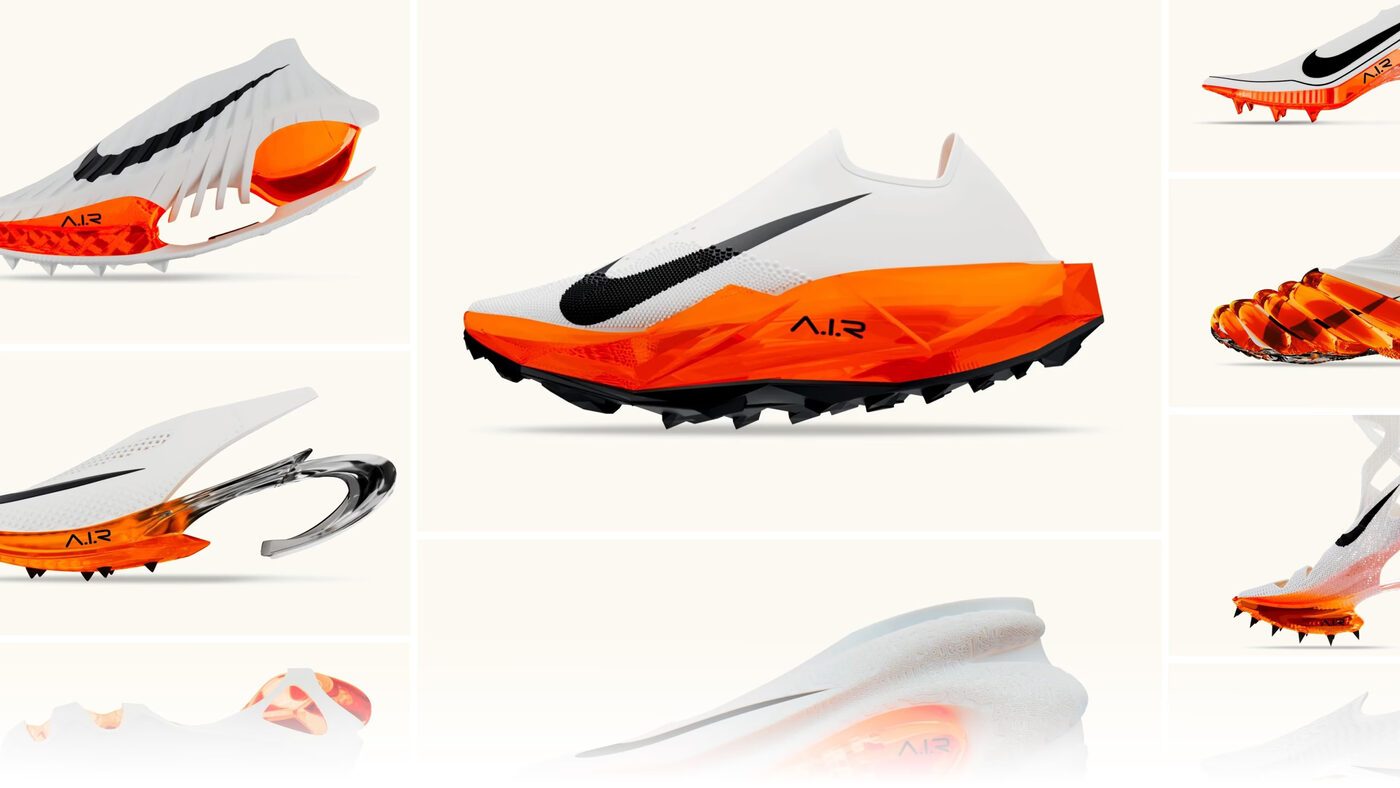
Figure 2.9, Nike A.I.R. (Athlete Imagined Revolution), 3D-printed, AI-assisted concept prototypes presented in Paris, April 2024. (Press image © Nike, Inc., about.nike.com, ‘Creating the Unreal’)
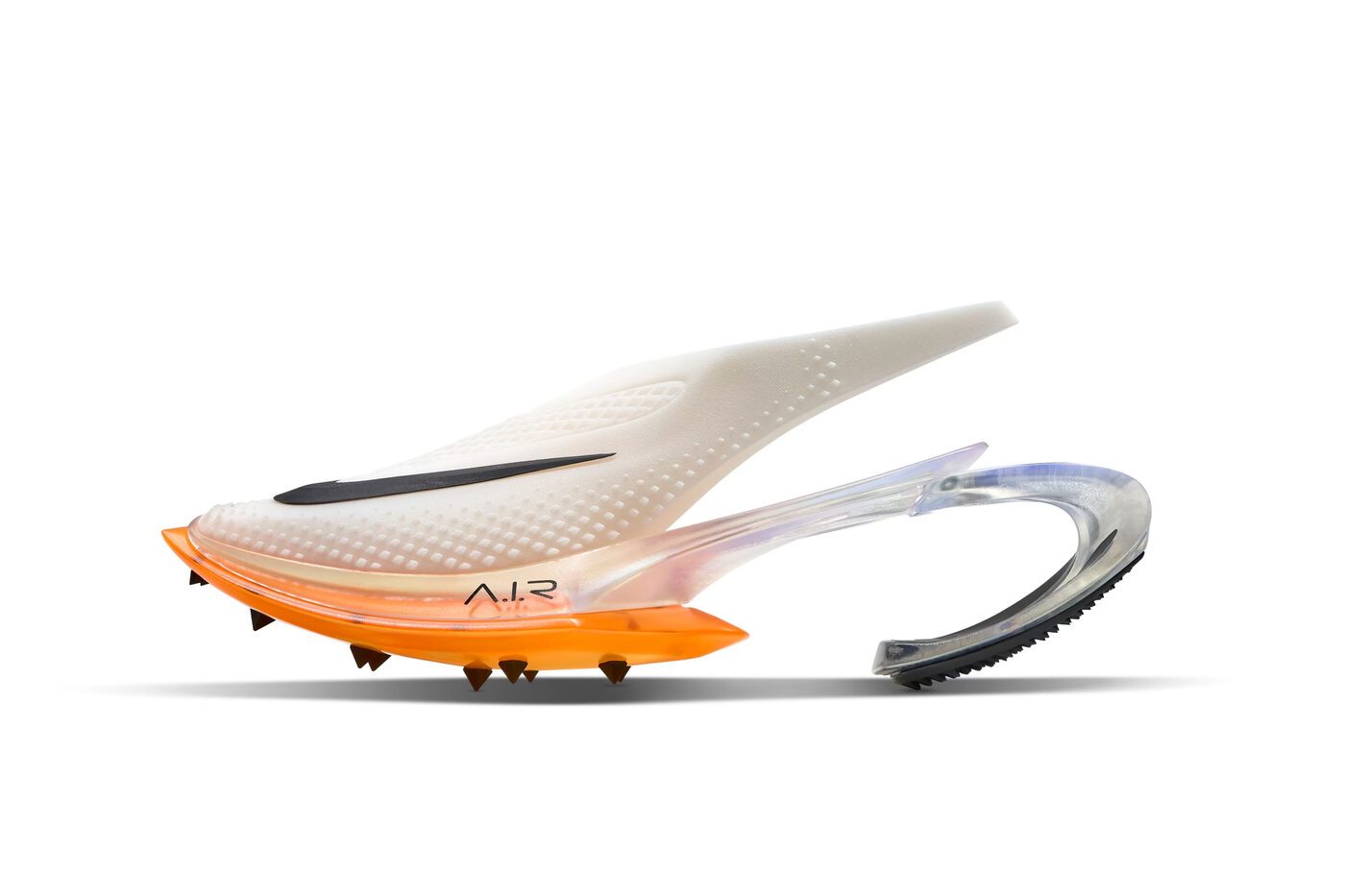
Figure 2.10, Nike A.I.R. prototype for sprinter Dina Asher-Smith: 3D-printed upper with TPU heel clip inspired by a slingback silhouette, persona and performance encoded in one geometry. (Press image © Nike, Inc.)
2.3.5 The AI-Assisted Ideation Workflow
The ideation workflow turns AI from a curiosity into a design method. It runs in four moves:
- Moodboard, collect references, colours, silhouettes and fabric cues that define the direction;
- Text-to-image, translate the moodboard into structured prompts (garment type, silhouette, material, colour, context);
- Image-to-image, feed the strongest result back into the tool and iterate on details such as sleeve length, collar or print placement, while keeping the family resemblance;
- Shortlist, select 3–5 concepts that survive a reality check against construction logic, fabric behaviour and cost.
Prompt engineering for fashion is mostly about describing what the image cannot show: construction (seams, darts, closures), silhouette (fitted, oversized, A-line), material rendering (drape, stiffness, sheen) and print placement (scale, repeat, alignment).
- Do: name the garment, the fit, the fabric and the camera.
- Don't: expect the tool to know pattern logic, grain direction or manufacturing, that is your job; never use an AI image as a tech pack; and always run a feasibility check before a concept moves on.
Try it now
Run three prompt rounds on ONE garment concept:
- Round 1, text-to-image from your moodboard;
- Round 2, image-to-image refinement of the best result;
- Round 3, a variation (colourway, fabric or silhouette).
Shortlist 3–5 concepts. Deliverable: your prompt set plus the shortlist with a one-line rationale each.
- EQF 4: Follow the three rounds using the prompt bank templates.
- EQF 5: Add one material or colourway variation per concept.
- EQF 6: Brief a complete capsule of 3 garments and critique the AI's limitations (construction, fit, manufacturability).
PROMPT BANK, five ready-to-use fashion prompt templates (replace the [brackets]):
- 'Editorial photo of a [garment type] in [colour], [silhouette], on a [body type] model, [setting and lighting], [camera]', concept exploration.
- 'Technical flat of a [garment], front and back, neutral background, [construction details: seams, darts, closures]', technical development.
- 'Close-up of [fabric] with [finish: matte, sheen, texture], drape study on a mannequin', material rendering.
- 'Repeat pattern, [motif], [scale], [colourway], seamless tile, textile print', print development.
- 'Same garment, [new colourway or material], consistent style, studio light', variation series.
← PreviousNext: 2.4 Digital Pattern Making and Zero-Waste Design →
2.4 Digital Pattern Making and Zero-Waste Design
Conventional cutting wastes 10–30% of fabric before a garment is even sewn. Zero-waste design eliminates this loss by making the fabric width a design constraint from the first sketch, and digital pattern-making tools have turned it from a craft practice into an industrially viable strategy.
2.4.1 Letting the Fabric Decide: Zero-Waste Pattern Making
Zero-waste fashion design reverses conventional logic: instead of imposing a silhouette on the fabric and discarding what falls between the pieces, the fabric dictates the garment's form. The key principles are interlocking patterns (pieces fit together like a puzzle and use the full fabric width), geometric and modular forms (rectangles, triangles, trapezoids that tessellate easily), and layout planning at the concept stage, so silhouette and pattern geometry are developed together. The approach is both ancient and modern: the Japanese kimono, the Indian sari, and early European tunics naturally avoided waste through rectangular construction; contemporary pioneers such as Julian Roberts (subtraction cutting), Timo Rissanen, Holly McQuillan (open-source patterns), and Mark Liu reconnected this heritage with modern practice. The new digital layer, CAD pattern making, simulation, and automated marker making in tools such as CLO3D, Optitex[35], and Browzwear, allows designers to plan and optimize fabric utilization on screen before cutting, and to combine zero-waste cutting with the broader eco-design agenda: durability, repairability, adaptable sizing, and modular redesign of remnants (aligned with ISO 14006 eco-design guidelines).
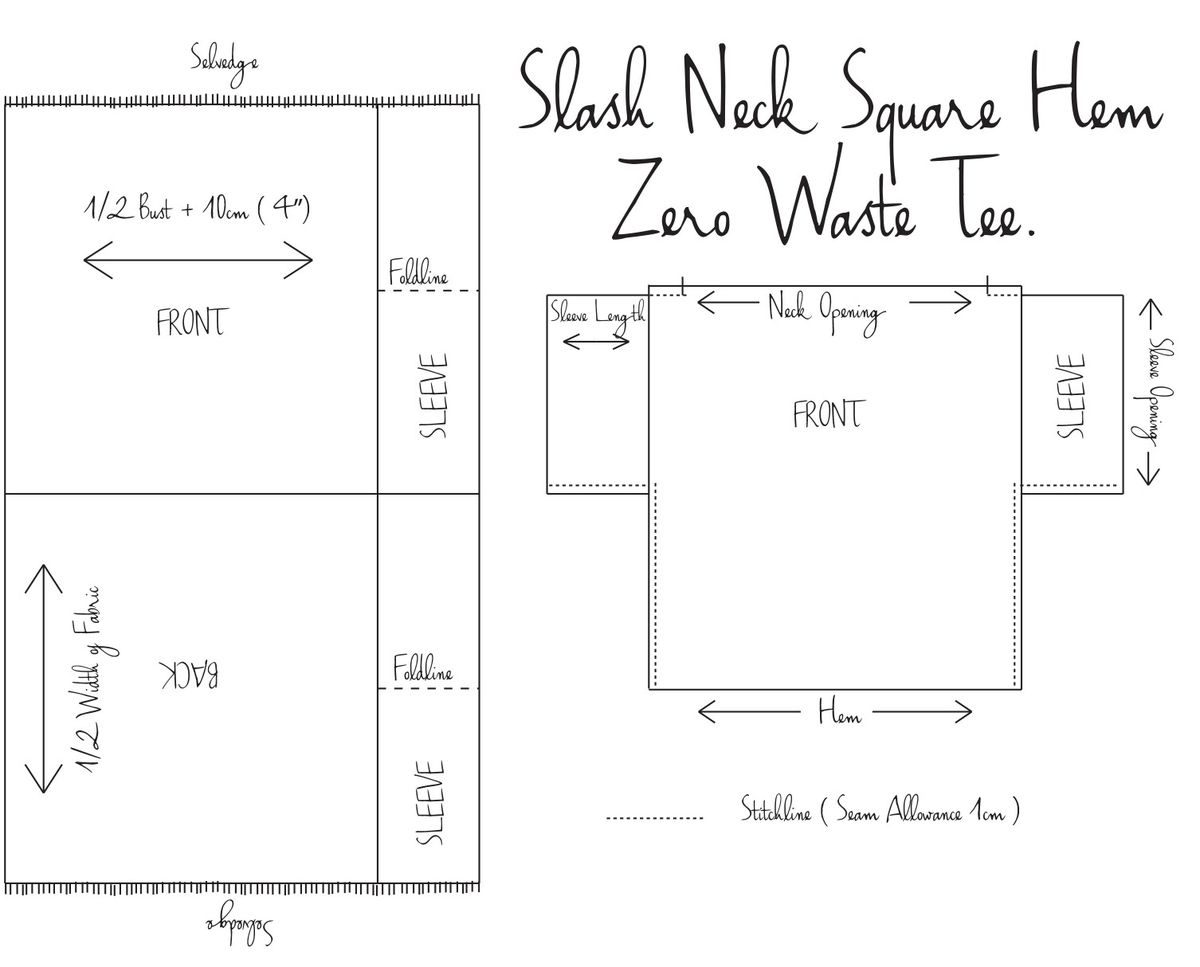
Figure 2.11, Zero-waste T-shirt pattern: the garment is designed inside the full fabric width, leaving no offcuts.
2.4.2 Case example: Timo Rissanen, the zero-waste hoodie
Timo Rissanen's zero-waste hoodie (2009) is one of the most influential documented examples of the method: the complete hoodie, body, sleeves, hood, pockets, facings, interlocks inside a single rectangle of fabric 172 cm wide, with every piece serving the garment. Rissanen published the pattern and reasoning openly, and the project became a reference point for the academic and industrial development of zero-waste practice.
At the brand level, Tonlé builds its entire production model on full material utilization: garments are cut for maximum fabric use, remaining scraps are transformed into new clothing and accessories, and the smallest offcuts become handwoven yardage, treating waste as raw material rather than a cost. Eileen Fisher[16] pairs recycled materials with its take-back program, returning used garments to the production cycle as renewed products. The combined insight: industrial digital tools (marker-making efficiency, digital grading) and craft methods (creative reuse of offcuts) are complementary; one maximizes efficiency, the other adaptability.
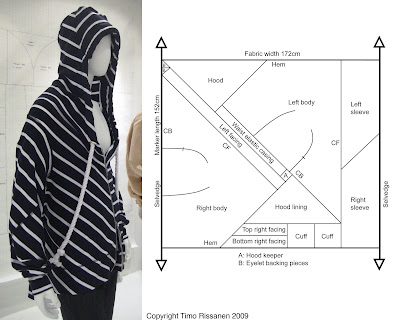
Figure 2.12, Timo Rissanen's zero-waste hoodie: garment and full-width interlocking pattern. (Source: https://zerofabricwastefashion.blogspot.com/2009/09/hoodie-attempt-to-explain.html)
2.4.4 Case example: PATLAB, pattern engineering and prototyping
PATTLAB (Pattern Laboratory), based in Olot, Girona, works as an external technical department for brands with no pattern room of their own: digital pattern development in Gerber AccuMark, digitization of physical patterns, grading, 3D simulation, prototypes from an in-house sample room, and fittings on site or online, with every pattern delivered as a documented package including measurement table and sewing chart. Single patterns from an adaptable library and real-size plotting billed by the sheet convert the fixed costs of industrial pattern engineering, licensed CAD, plotter, pattern maker, sample room, into per-unit ones that a brand producing two collections a year can actually carry.
The material saving is indirect but measurable: sampling waste is a function of how many physical prototypes a garment needs before it fits, and simulation before the first cut, shrinkage testing on the production fabric, and fittings prepared with the garment measured in advance each reduce that count. The insight for SMEs: access to industrial pattern accuracy is now rented by the unit, and accuracy upstream is what keeps fabric out of the bin downstream.
Figure 2.13, PATTLAB (Pattern Laboratory), Olot: pattern engineering, prototyping and real-size plotting offered as a per-unit service to brands without an in-house pattern room. (Source: https://www.pattlab.com/en/)
← PreviousNext: 2.5 Modular Parametric Tesselation Tutorial →
2.5 Modular Parametric Tesselation Tutorial
This tutorial turns the parametric principles of section 2.2 into a working file. The exercise builds a modular tessellation, a surface composed of repeated interlocking modules whose density, size and orientation are driven by parameters rather than drawn by hand. It is the geometric logic behind the Kinematics dress of section 2.2.2 and behind most 3D-printed and laser-cut garment surfaces.
Work in Grasshopper with Rhinoceros, or in Blender Geometry Nodes if an open-source environment is required. The sequence is the same in both. First, define the base surface, either a simple developable panel or a region taken from a body scan. Second, generate the tessellation grid and expose its density as a parameter rather than fixing it. Third, build one module as a reusable component and instance it across the grid, so that editing the single module regenerates the whole surface. Fourth, drive one local attribute, module size, thickness or aperture, from an attractor point or from a data field such as a pressure or wear map, so that the surface responds to information rather than to taste. Fifth, prepare the output for manufacture: verify wall thickness and connection tolerance, then export for 3D printing or laser cutting.
Deliverable: one parametric definition, two rendered variants generated by changing parameters only, and a three-line note stating what each parameter controls and which manufacturing process the geometry has been prepared for.